What people actually use it for
Every backup product describes itself the same way, so the honest version of this page is not a feature list. It is six situations people were already in when they came to us, and what the platform does about each one.
The screens below are the built-in demo dataset, which is why they say so. The console will not render sample data into a real session.
Something wrote over a file and nobody knows when
The scenario is the same whether it was ransomware, a bad migration or a script with a wrong path: a file is now wrong, the last known-good version is somewhere in the backup history, and the question is which recovery point still holds it.
Restoring points one at a time to find out is the usual answer, and it is a bad one — each restore costs an environment to land in and an hour to confirm, and three wrong guesses is most of a day.
Instead, put the query across several recovery points at once and read the answer.
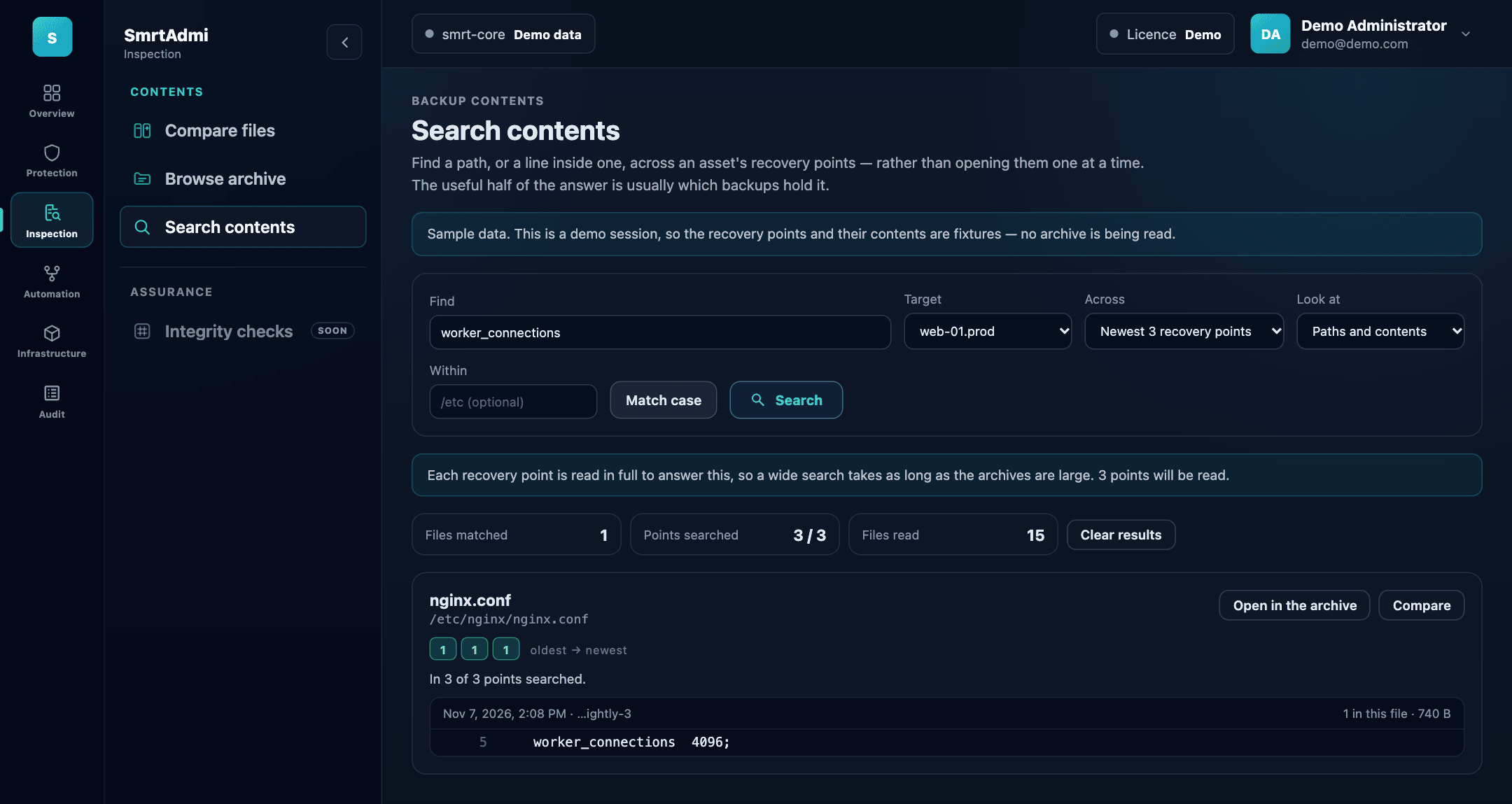
Search reports how many points it is about to read before it reads them, then names what it found in each — and, just as importantly, names any point that failed to answer. "Not found" and "not looked at" are different answers and only one of them is safe to act on.
Then browse into the point you picked and read the file out of the archive to confirm it before you commit to a restore. No restore has been started at this stage; nothing has been written anywhere.
Two things make this a control rather than a convenience. Policies can mark retention immutable, so a recovery point cannot be altered before its window expires — including by whatever got in. And inspecting a failed run is refused outright, because an empty file listing reads as "nothing was backed up", which is the one sentence a DR console must never say by accident.
What this is not: the platform does not detect that an encryption event happened. It tells you what is in each recovery point once you go looking.
A firewall rule changed and nobody can account for it
Network and security gear is usually the least-backed-up thing in an estate and the most painful to rebuild from memory. Cisco, Juniper, Palo Alto and Fortinet are first-class targets here — on the same policies, schedules and retention as the databases, with NGINX registered the same way as a service.
The agent on your own network is what reaches them, so nothing has to be exposed outward, and the device record keeps what was actually found: product, version, whether it answered, when, and which agent looked.
Because a captured configuration is just a file in a recovery point, you diff it the same way you diff anything else.
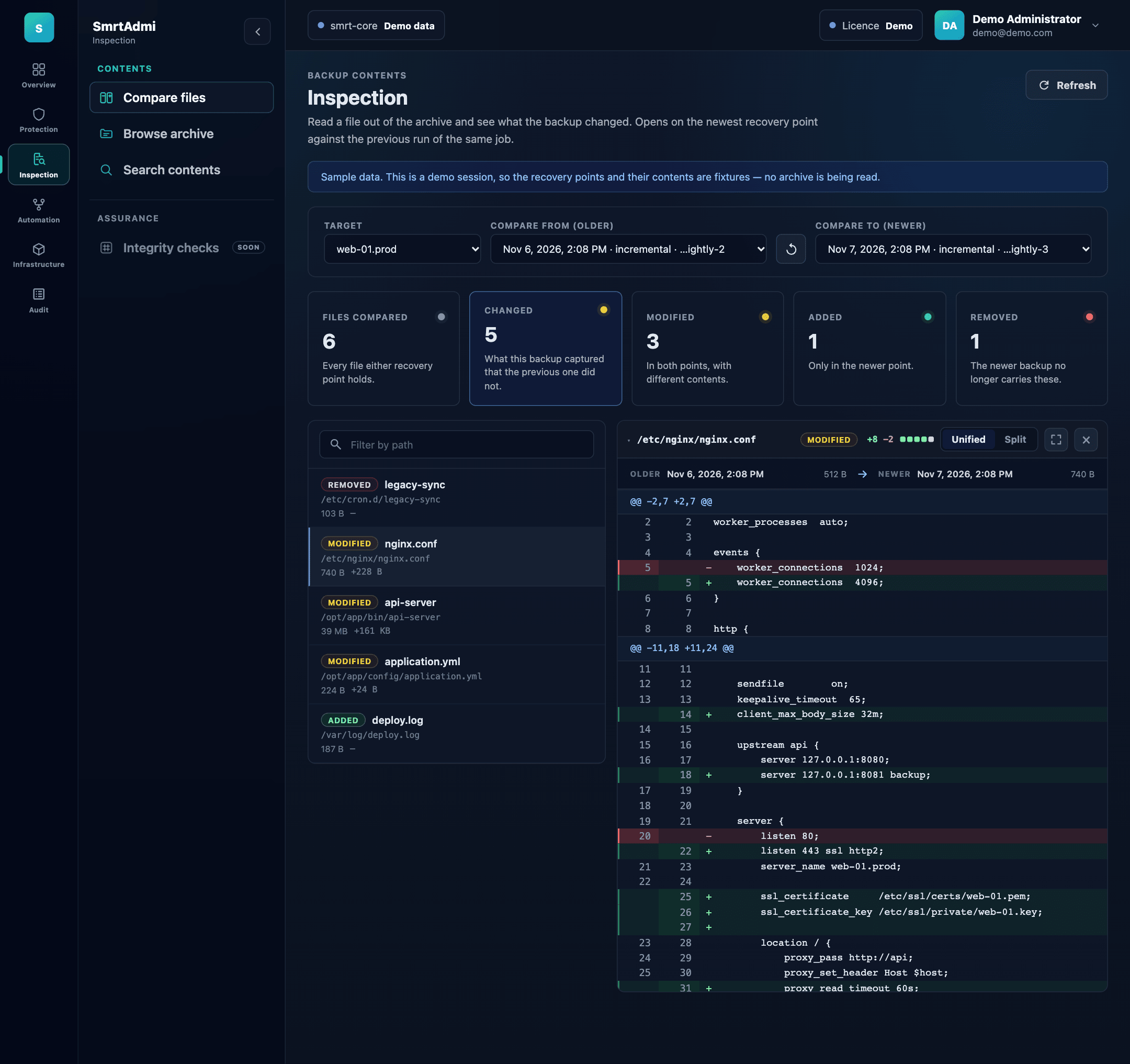
Tuesday against Thursday, on the running configuration as the device actually had it. The usual question after an outage is not "do we have a backup" — it is "what changed since the last time this worked", and that is a diff, not a restore.
The backup has been failing for a week and nothing said so
The classic way an estate becomes unrecoverable is quiet: one job starts failing, four screens record it, and nobody is looking at any of them.
Three deliberate choices work against that.
Protection state is re-derived from the clock on every read. An asset silently ages from healthy into at-risk when no backup runs; it does not stay green because the last successful write said so. An asset that is still configured correctly and has simply stopped being protected shows up as the second thing, not the first.
The console opens on what could stop a recovery. RPO breaches, failed jobs, agents that have gone quiet and assets with no policy attached come before any reassuring number.
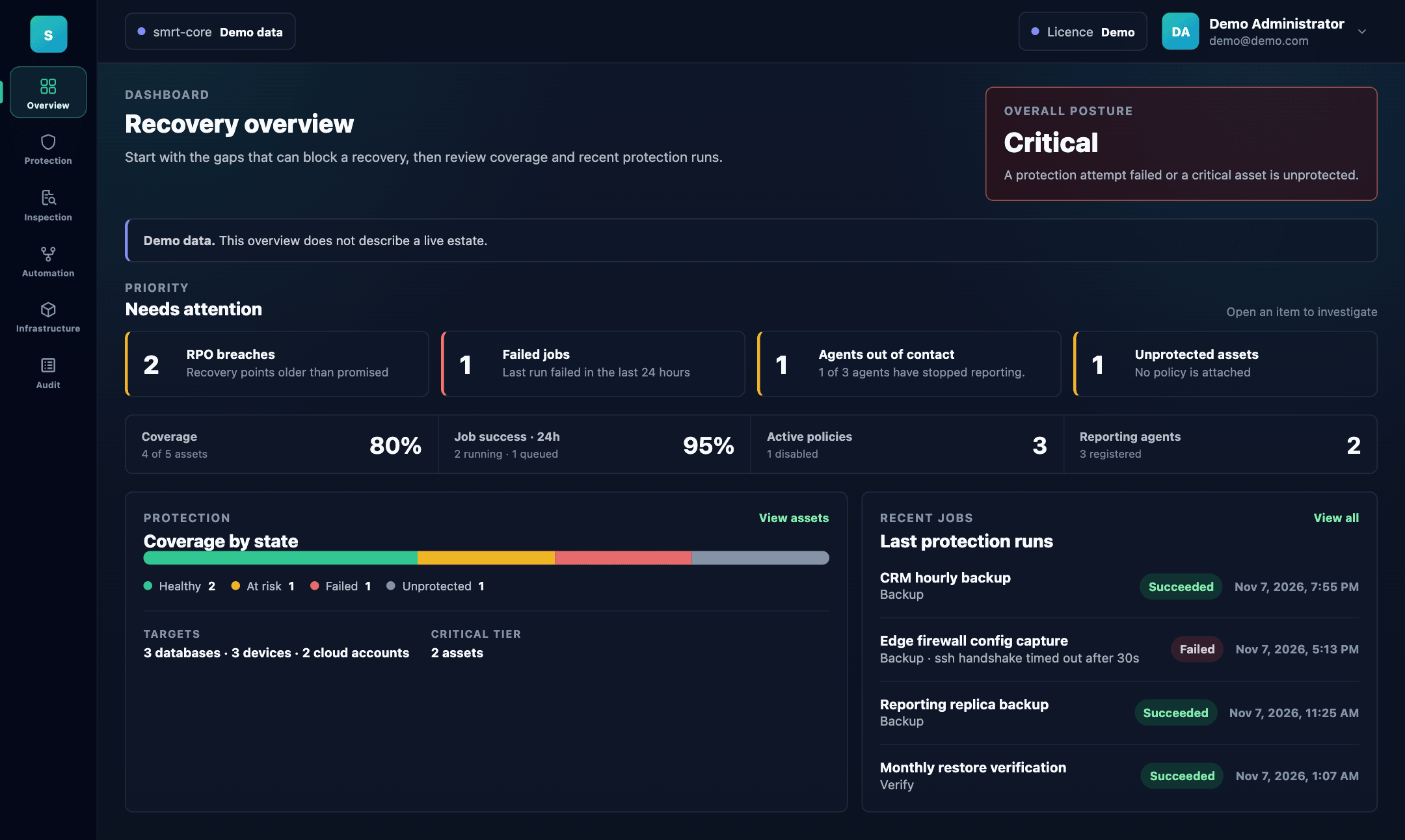
Coverage of 80% is on this screen, but it is not what the screen is about. The four items above it are.
Somebody is actually told. Slack, Microsoft Teams and signed generic webhooks, with delivery held in a table rather than in memory — because the incident that kills the process is exactly the one somebody needs to hear about. Every rendered body is stored verbatim, which makes the first question after an outage nobody noticed — did we tell anyone? — answerable.
The recovery plan has never actually been performed
Getting the data back is the easy half. The rest is a sequence: quiesce the application, stand up somewhere for it to land, restore the database, point DNS at the new thing, check that what came back is what left.
That sequence usually lives in a wiki page written after the last incident, by somebody who has since changed jobs, and is performed for the first time under load by whoever happened to be on call.
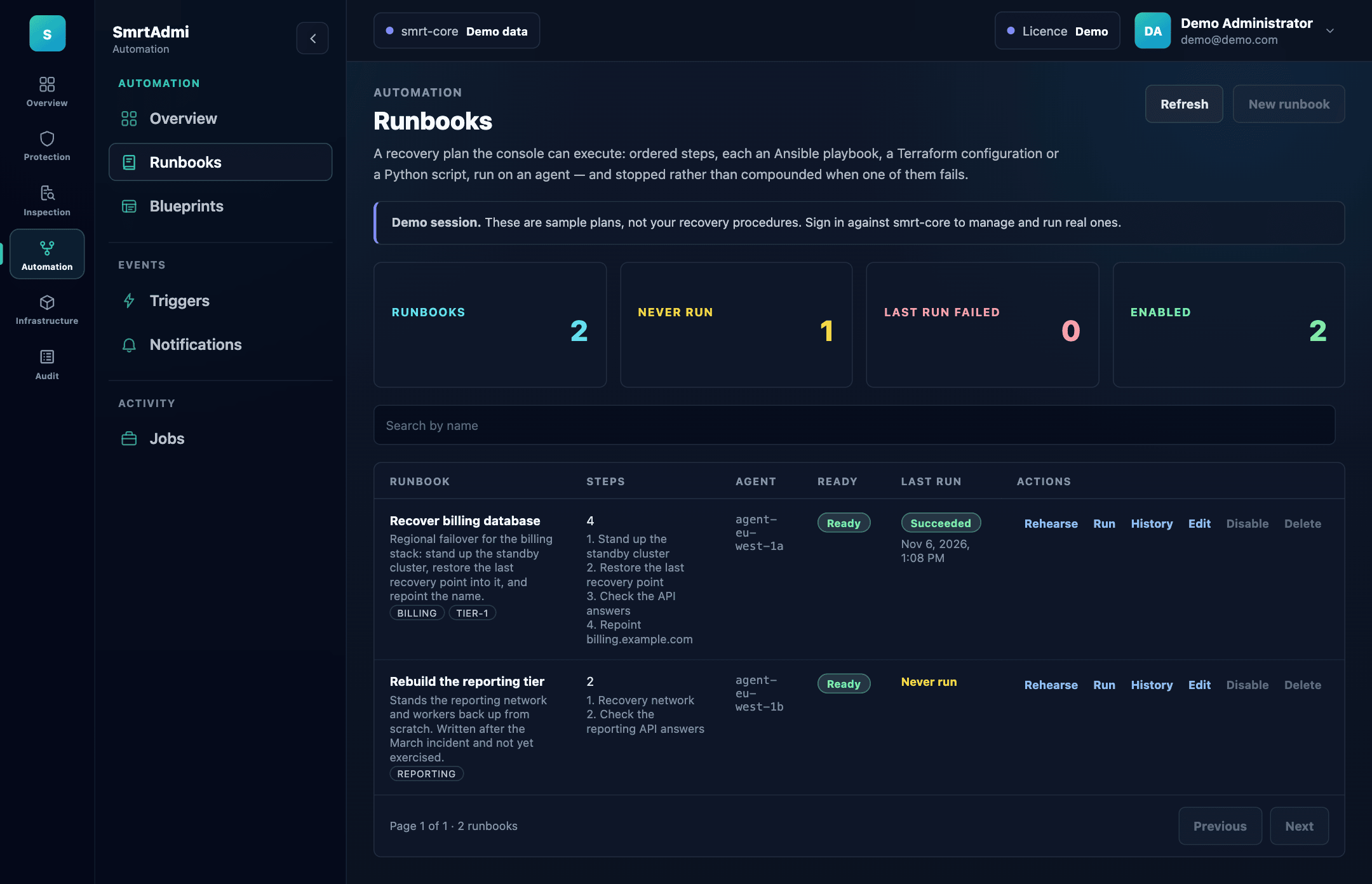
Steps are dispatched one at a time, and step n+1 is queued only once step n has actually succeeded — a failed restore stops the plan rather than being compounded by everything that was supposed to happen after it. Rehearse and Run are separate controls, not a mode toggle someone can leave in the wrong position.
A rehearsal rewrites every verb to its read-only counterpart before anything is dispatched: Ansible gets --check --diff, Terraform gets plan, and a destroy becomes a plan too — so the rehearsal shows what would be torn down without tearing it down.
This is where you want to discover that the dump path does not exist on the host, that the standby subnet was reclaimed, or that the credential expired. All three are ordinary rehearsal failures and all three are catastrophic live.
A release needs a backup taken minutes before it, not six hours earlier
A scheduled nightly backup is the right answer to hardware failure and the wrong answer to a deployment. The recovery point you want when a release goes badly is the one taken immediately before it, not the one taken at 02:00 against a different version of the schema.
An inbound trigger is a URL your pipeline calls:
curl -X POST https://smrt.example.test/api/automation/triggers/fire \
  -H "X-Smrt-Trigger-Token: $SMRT_TRIGGER_TOKEN" \
  -H "Content-Type: application/json" \
  -d '{"reason": "deploy 4821"}'
The token goes in a header, never in the URL — a URL is logged by every proxy, load balancer and CI system it passes through, and this token starts code running on machines holding your data. It is hashed at rest, shown exactly once when it is minted, and audited on every use.
The pipeline then waits for backup.completed rather than job.succeeded. Those are deliberately two events: the first says a run finished, the second says something can be restored from — and only the second is what a pipeline waiting on a pre-deployment backup actually asked for.
The alternative most pipelines use is a sleep.
An auditor asks where the backups go and how long they are kept
Not a recovery scenario, but the one that most often starts the conversation.
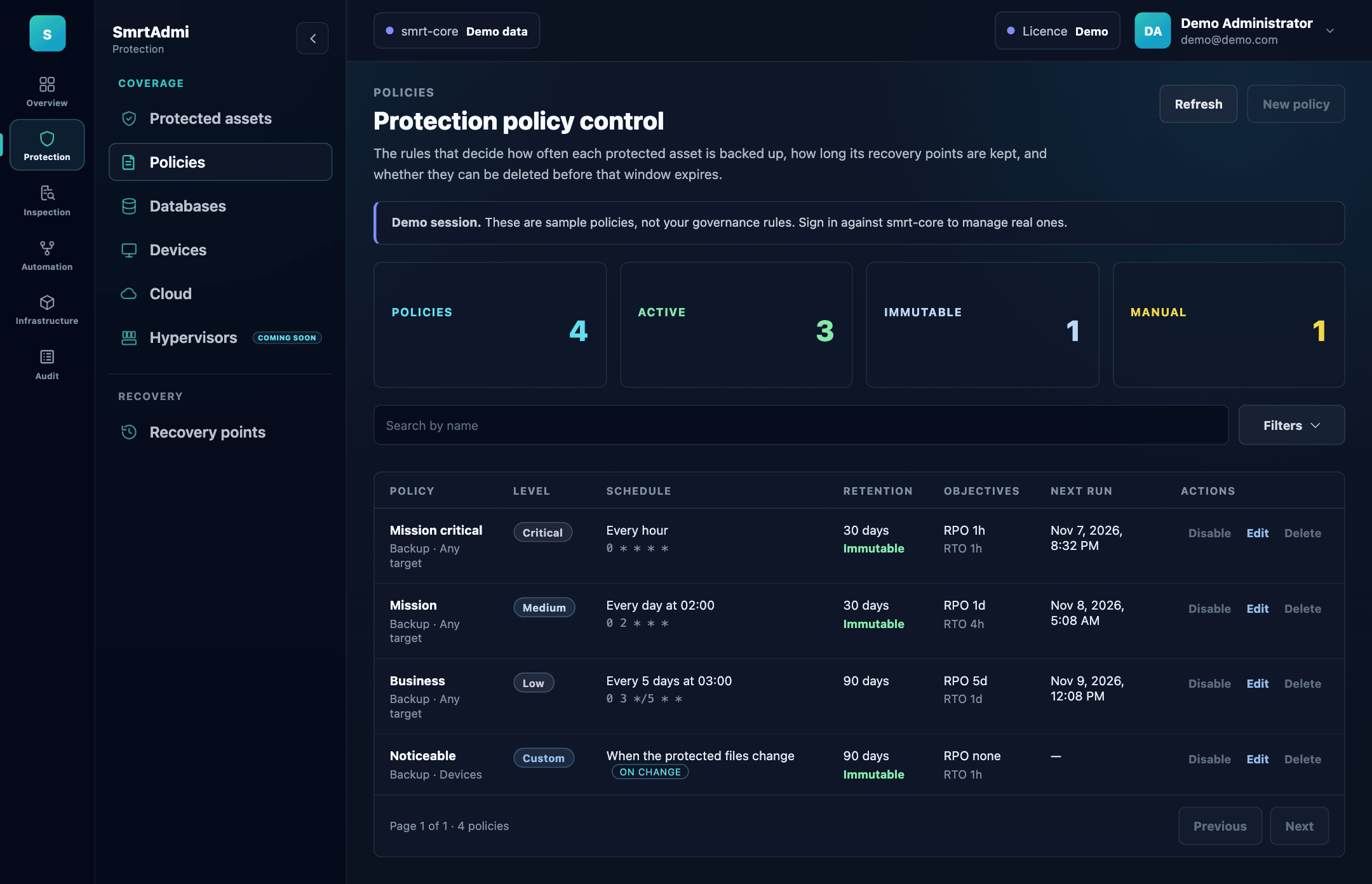
Cadence, retention, immutability and the objectives the policy commits to, one row per policy — rather than a schedule in one tool, a retention setting in another and an RPO in a slide deck.
What there is to show:
- Policies state cadence, retention and whether a stored point can be altered before its window expires. Deleting a policy that assets still reference is refused, because an orphaned asset is an unprotected asset that still looks configured.
- Coverage is computed across the estate and excludes what you explicitly excluded — so an asset deliberately left out does not quietly depress the number and train everyone to ignore it.
- Audit records every operator action and every run: what ran, against which asset, with what outcome, initiated by whom, and when. It is queryable per database, per device, per cloud account and per job.
- Storage is yours. Recovery points land in your bucket, your region, under your lifecycle rules — S3 or MinIO, Azure Blob, Google Cloud Storage, SFTP, NFS or local disk.
- Restoring is a job, with progress, an outcome and an audit entry. Not a button that returns to an idle screen and leaves you wondering.
And where the platform runs is your choice: hosted by us, or self-hosted inside your perimeter. The deployment is licensed offline — a .lic file verified against keys compiled into the binary — so an air-gapped estate is a supported configuration rather than an exception, and nothing phones home.
A note on the cloud accounts
An estate on AWS or Azure keeps most of what makes it itself outside any filesystem: the VPCs and virtual networks, the security groups, the IAM roles, the load balancer rules, the DNS zones, the policy assignments. None of it is on a disk an agent can walk. Losing a subscription to a mis-scoped policy or a closed account destroys that as thoroughly as a failed array destroys a volume, and with considerably less warning.
So an AWS account and an Azure subscription are protected targets here in the same sense a firewall is — the control plane captured and versioned under the same policies as everything else. The data plane is deliberately not captured: the object inventory of a bucket, not the objects. Backing up the data twice under a different name would double your egress bill to produce a second, worse copy.
What we will not tell you it does
The same honesty applies here as in the console.
- PostgreSQL is the engine backed up end to end today. MongoDB and ScyllaDB are registered target types; the console says so plainly rather than letting an asset read as covered when it is not.
- Integrity verification is not built yet. Re-reading a stored recovery point against the hashes recorded at upload is on the bench, and until it ships the console says the page is planned rather than showing a green tick nobody earned.
- Nothing tracks whether a human acknowledged an alert. A trigger can start an escalation plan today; escalation timers and digests are not built.
- Cloud accounts are not yet runbook subjects. They are protected targets; binding a runbook step to an account is a design question we would rather answer against a real recovery flow than guess at now.
If one of these is the situation you are in, mail contact@daydev.org with roughly what you run. We will show you the console against a realistic estate rather than a demo that only contains healthy assets.
The DR platform · Recovery automation · Security model · Deployment options